Changelog
Changelog
What shipped, and when. Only things you can use today.
Last updated October 12, 2026
New
A new inbox and dashboard, for every workspace
My Inbox gathers your alerts, search finds any chat, message or help article, and the command bar (Ctrl or Cmd and K) takes you anywhere. Save the views you use as folders, and turn on browser alerts and sounds. You can switch back to the old dashboard for now.See the inboxImproved
A new Corner logo
The c that ends in a chat tail. It's on the website, in the dashboard, on Corner's emails and as the icon in your browser tab.New
Help articles: collections with icons, your order, and picks for the messenger's Home
Group articles into collections with an icon and a line each, and put collections and articles in the order you want. Choose the articles the messenger's Home shows first, and preview the real messenger as you write.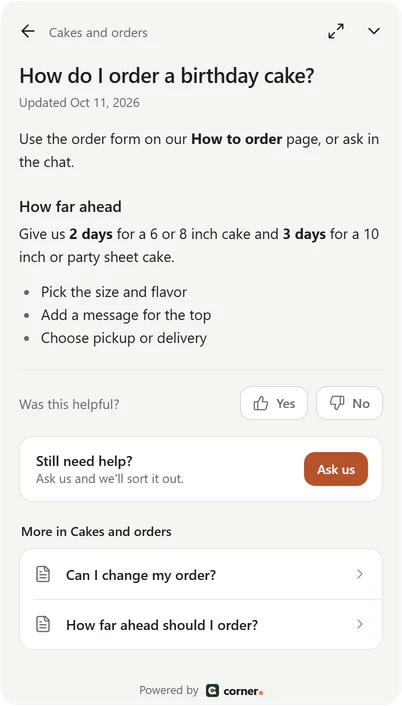
Real Corner messenger, demo bakery.
How help articles workNew
AI help in the inbox: rewrite a reply and sum up a chat
Rewrite your reply to sound more professional, friendlier or shorter, or fix only spelling and grammar, with every fact, name and link kept and Undo to get your words back. A chat summary shows what the visitor wants, what they were told and what's waiting.See the inboxNew
Popular questions suggested from your own website
Suggest from my website offers up to four questions for the messenger, each one answered by your own pages, files, help articles or saved answers. Nothing is saved until you pick the ones you want.Make the messenger yoursNew
Visitor details, team notes about a visitor, and blocking
See where a visitor is, their local time, the pages they viewed while chatting and their earlier chats. Keep notes about a person across all their chats, and block a visitor for a day, a week, a month or for good.Visitors and blockingImproved
A lighter, calmer dashboard
White surfaces on a light ground, quieter buttons, and a reply box with Reply and Note tabs.Improved
Sign in and confirm your email with a 6-digit code
Corner emails you a code instead of a link. The code is in the email's subject, so your phone can fill it in, and it works for 10 minutes.New
Choose how long chats, leads and files are kept, and delete everything about a person
Each assistant keeps chats and leads for the time you choose, then deletes them for good. When someone asks, delete everything about them in one step, found by their email.Keeping and deletingFixed
Stronger protection against fake chats
New chats are limited per visitor address, so one visitor can't use up your month's AI conversations, and blocked visitors cost nothing.How Corner is protected
Coming next
What we're building, in the order we're building it. No dates: each part lands here the day it ships.