An AI chatbot for your Lovable site, added with one prompt
Corner adds an AI chatbot and live chat to your Lovable site with one prompt in the Lovable chat. It reads your pages as visitors see them, answers with sources, and hands chats to you.
Free forever: unlimited live chat and 30 AI conversations a month. No card.
No sign up to try it.
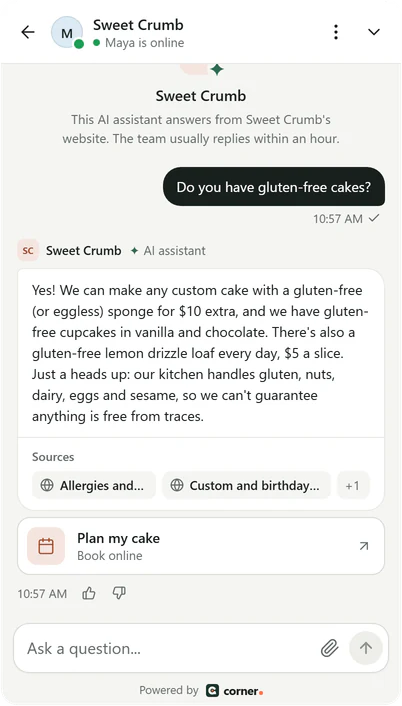
Real Corner messenger, demo bakery.
Steps for Lovable
About five minutes. No coding skills needed: you copy one prompt from Corner and paste it into the Lovable chat, which makes the change for you.
- 01
Copy the prompt from Corner
Sign up free and type your website's address. Corner reads it while you watch. In Settings > Channels > your website > Install, pick the Lovable, Bolt, v0 tab: the prompt there already holds your line, with your assistant's key filled in.Add this script tag to every page of my site, just before the closing </body> tag. Don't change anything else. <script src="https://api.getcorner.ai/widget.js" data-bot="YOUR_ASSISTANT_KEY" async></script> - 02
Paste it into the Lovable chat
Open your project in Lovable and paste the prompt into the chat, like any other request. It asks for one thing: the script tag on every page, just before the closing body tag, and nothing else changed. Look over the change it suggests before you keep it. - 03
Publish the change
Visitors only get the messenger once the change is on your published site, so Publish it, the same way you publish any other edit. - 04
Check it's live
Open your website once. The Install tab in Corner changes to Live, usually within a minute. The messenger goes live after you confirm your email address, with the code Corner emailed you.
The same line works on any website. Guides for WordPress, Shopify, Wix, Squarespace and Webflow, and the Lovable steps in the docs. Every integration
If it doesn't work on Lovable
What to check first, before you write to us.
- The builder put the line inside a component
- Ask it to move the script tag into index.html, just before the closing body tag. That file is the starting page every address of your site loads, so the messenger loads once and stays as visitors move around.
- The key in the line changed
- The value after data-bot is your assistant's key, and the messenger needs it exactly as Corner gave it. Copy the prompt again and ask the builder to use that line as it is.
- Corner read only your home page
- Corner follows the links your pages show. If some pages are only reached through a button that runs code rather than a link, add a sitemap, or give Corner those page addresses one by one, then re-read.
- It shows on the published site, but not in your preview
- The preview runs at a different address. Add it under Allowed domains, or check the messenger on your published site.
What Corner reads on a Lovable site
A site made with an AI builder usually sends the same small starting page for every address, then fills in the real content with JavaScript. Corner notices this and opens each page in a real browser, the way a visitor would, so it reads what people actually see.
It starts at your home page, reads your sitemap if you have one, and follows the links each page shows once it has loaded. Content in tabs and in sections that open and close is read too. Login, account and checkout pages are skipped, and so are pages marked noindex.
How many pages: 100 on Free, 500 on Starter, 2,000 on Builder and 5,000 on Studio. Each time you publish new pages, re-read your website in Corner, or let it re-read every day or week.
Lovable notes
The prompt ends with “Don't change anything else” on purpose. An AI builder may also rework code near the change, and you only want one new line. If the change touches more than that, ask it to undo the change and try the prompt again.
The messenger loads on your website's own address, its subdomains, and any other domains you add under Allowed domains on the Install tab. If you open your site at a different address, like a preview link, add that address there, or check on the published site.
Bolt and v0 take the same prompt. Building on your own code instead? The React and Vue steps put the same line in index.html.
What it does and doesn't do
- It answers from your published pages, with sources, even when they're filled in with JavaScript.
- It doesn't change your Lovable project. Lovable adds the line, and Corner only reads your public pages.
- It isn't a Lovable add-on to switch on: one prompt adds one line, and deleting the line removes it.
- The assistant is the same on every platform. How the AI chatbot answers
Lovable questions
Ready to see it answer on your Lovable site?
Type your website. Corner reads your pages in about a minute, before you install anything. No sign up.
Free plan, no card. Live chat is unlimited on every plan.