An AI chatbot for law firms, built to stay out of legal advice
Corner handles the first questions people bring to a firm: which matters you take on, how fees work, where your offices are and how a first consultation is arranged. It replies from your own website, keeps intake to the basics, and leaves legal advice to your lawyers.
Free forever: unlimited live chat and 30 AI conversations a month. No card.
No sign up to try it.
The questions law firms get every day
What prospective clients want to know before they pick up the phone.
- Do you handle divorce and custody?
- Is the first consultation free?
- Do you work on a contingency basis?
- Which lawyer deals with employment disputes?
- Can I meet someone this week?
- Do you have an office downtown?
- What should I bring to my first meeting?
- Do you offer fixed fee wills?
Fees and practice areas come from what your site publishes. Anything beyond that goes to your team.
What it answers, and what it hands to you
Practice areas and fees
- Which kinds of matters the firm takes on.
- Fee structures exactly as your pages describe them.
- A link to the practice area page behind each reply.
Consultations
- Your scheduling page as a button, if you use one.
- Otherwise a name and contact for your intake team.
- Your staff confirm every meeting themselves.
Sensitive moments
- A phone button for anyone who needs a lawyer now.
- It suggests your team when someone is distressed.
- It never weighs up the strength of a claim.
Reception time
- Fewer calls asking where you are and what you charge.
- A list of questions your pages left unanswered.
- Write a better reply once and it's reused.
Rules for the questions that matter most
Corner is built to answer from your own website and files, and to say so when they don't cover a question, instead of guessing. You add the rules for your business on top.
No legal advice, no case details
Corner is there for practical questions about the firm. It's built not to interpret the law, assess a case or predict an outcome.
- Put "legal advice" under Never talk about, and it points those questions to your lawyers.
- Ask it under Anything else it should know to tell visitors not to share the facts of their matter in chat.
- Switch off "Let visitors send images and PDFs", so no documents arrive through the messenger.
- Keep chats for as little as 30 days, then they're deleted for good.
Intake that's fit for a conflict check
When someone wants a consultation, Corner asks for a name and an email or phone number. The kind of matter they mentioned is right there in the chat.
- Name, contact and the type of matter, like family, property or employment.
- Write your own consent line, shown under the contact form.
- Describe under Ask for details when which enquiries should leave contact details.
- Contact details taken this way don't use up AI conversations.
More about lead capture, on every plan.
Reply yourself, from your desk or your phone
Every chat lands in one inbox with what the assistant said and the pages it used. Step in whenever you like.
- When a customer asks for a person, you get an email. Slack alerts are on Builder and Studio.
- The dashboard works in your phone's browser, so you can take over a chat from the kitchen, the chair or the van. See the inbox
- Add a "Call us" or WhatsApp button to the messenger, and it shows under answers when a customer wants to talk.
- Away or busy? Customers leave their email or phone number, and if they've gone when you reply, your reply is emailed to them. How live chat works
Live on your WordPress or Squarespace site in about five minutes
No coding skills needed. Check its answers before any customer sees it.
- 01
Type your website
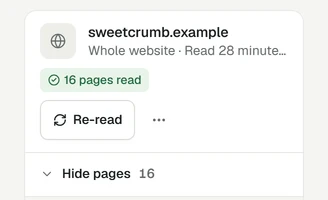
Corner reads your pages while you watch. Add your menu, price list or PDFs too.
- 02
Check its answers
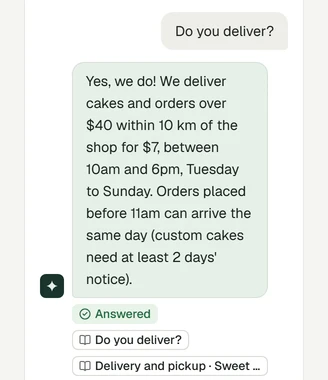
Ask what your customers ask. Test chats don't count.
- 03
Add it to your site
Paste one line, follow the guide for your platform, or send it to your web person.
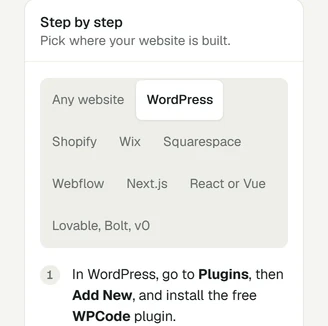
Guides for WordPress, Squarespace, Wix or Webflow, or any site where you can paste one line. Not sure yet? Try it on your own website first, with no sign up.
What it costs
Start free. You pay for AI conversations, never for live chat, and one price covers your team.
- Free30 AI conversations a month$0
- Starter100 AI conversations a month$19 /mo
- Builder400 AI conversations, 3 seats$49 /mo
Free
Try it on your firm's site
$0no card needed
30 AI conversations a month, 1 seat
Starter
For a solo practitioner
$19per month
100 AI conversations a month, 1 seat
Builder
For a firm with an intake team
$49per month
400 AI conversations a month, 3 seats
See full pricingOn Builder and Studio you can turn off the Corner badge. Building sites for law firms? Corner for agencies
Honest limits
- Corner doesn't run conflict checks or connect to practice management software. Your team does the check from the lead.
- It isn't a place for confidential documents or case files. Those belong in your firm's own systems.
- Corner doesn't book appointments or take payments. It shows your booking or payment link as a button.
- It works on your website, not inside WhatsApp or social inboxes. A WhatsApp button can open a chat with you there.
- The messenger's own buttons are in English. Answers follow each customer's language.
Common questions
See how it answers from your firm's pages
Type your website. Corner reads up to 20 pages in about a minute. No sign up.
Free plan, no card. Live chat is unlimited on every plan.