An AI chatbot for gyms and fitness studios
Corner gives people thinking of joining quick answers about class times, membership prices, opening hours and trial passes, straight from your website or timetable. It points them to your sign up or class booking page, and leaves injuries and health questions to your coaches.
Free forever: unlimited live chat and 30 AI conversations a month. No card.
No sign up to try it.
The questions gyms and fitness studios get every day
The questions people ask while deciding whether to join.
- What time is spin on Tuesday?
- How much is a monthly membership?
- Do you have a free trial?
- Can I freeze my membership while I travel?
- Is there a beginners yoga class?
- Are you open on public holidays?
- Do you have showers and lockers?
- Can I train with a back injury?
Health and injury questions go to your coaches. Prices and times come from your pages.
What it answers, and what it hands to you
Timetable and hours
- Class times from your schedule page or a PDF timetable.
- Opening hours, including holidays your site lists.
- Facilities like showers, lockers and parking.
Memberships
- Membership options and prices you publish.
- Your freeze, cancellation and guest rules.
- Your join page as a button under the reply.
Trial passes
- Explains the trial offer your site describes.
- Takes a name and contact to follow up.
- Or sends them to your sign up page.
Front desk
- Up to 6 popular questions on the messenger's Home.
- Answers at 5 am, before your first class.
- Spot what new visitors keep asking.
Rules for the questions that matter most
Corner is built to answer from your own website and files, and to say so when they don't cover a question, instead of guessing. You add the rules for your business on top.
No medical or injury advice
Corner talks about your gym, not anyone's body. It's built not to suggest exercises for an injury, a condition or a pregnancy.
- Add "medical advice" and "injury advice" under Never talk about.
- Under Offer a person when, name injuries and health conditions, so it hands those to a coach.
- It won't invent a discount or a promotion your site doesn't mention.
- Run your trickiest member questions in the dashboard before it goes live.
Trial passes and new members
Someone keen to try a class or join leaves a name plus an email or phone number, and an email alert goes to your team.
- Trial pass and taster class requests.
- Corporate or group membership enquiries.
- Choose which requests count under Ask for details when.
- Each new member lead is free. Your plan counts AI conversations only.
More about lead capture, on every plan.
Reply yourself, from your desk or your phone
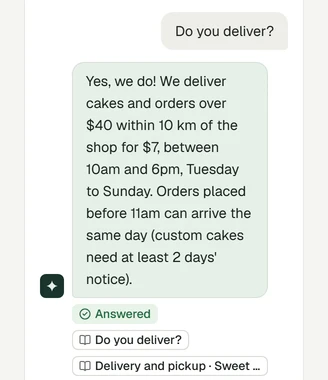
Every chat lands in one inbox with what the assistant said and the pages it used. Step in whenever you like.
- When a customer asks for a person, you get an email. Slack alerts are on Builder and Studio.
- The dashboard works in your phone's browser, so you can take over a chat from the kitchen, the chair or the van. See the inbox
- Add a "Call us" or WhatsApp button to the messenger, and it shows under answers when a customer wants to talk.
- Away or busy? Customers leave their email or phone number, and if they've gone when you reply, your reply is emailed to them. How live chat works
Live on your Wix or Squarespace site in about five minutes
No coding skills needed. Check its answers before any customer sees it.
- 01
Type your website
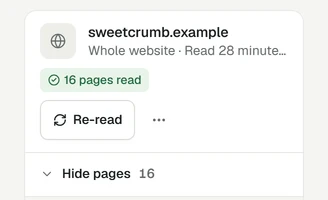
Corner reads your pages while you watch. Add your menu, price list or PDFs too.
- 02
Check its answers
Ask what your customers ask. Test chats don't count.
- 03
Add it to your site
Paste one line, follow the guide for your platform, or send it to your web person.
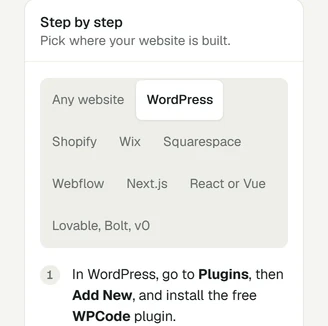
Guides for Wix, Squarespace, WordPress, Shopify or Webflow, or any site where you can paste one line. Not sure yet? Try it on your own website first, with no sign up.
What it costs
Start free. You pay for AI conversations, never for live chat, and one price covers your team.
- Free30 AI conversations a month$0
- Starter100 AI conversations a month$19 /mo
- Builder400 AI conversations, 3 seats$49 /mo
Free
Try it on your gym's site
$0no card needed
30 AI conversations a month, 1 seat
Starter
For a single studio
$19per month
100 AI conversations a month, 1 seat
Builder
For a gym with coaches on the desk
$49per month
400 AI conversations a month, 3 seats
See full pricingOn Builder and Studio you can turn off the Corner badge. Building sites for gyms and fitness studios? Corner for agencies
Honest limits
- It can't see live class spaces or sign anyone up. Members book in your own booking app.
- It doesn't connect to gym management or membership software.
- Corner doesn't book appointments or take payments. It shows your booking or payment link as a button.
- It works on your website, not inside WhatsApp or social inboxes. A WhatsApp button can open a chat with you there.
- The messenger's own buttons are in English. Answers follow each customer's language.
Common questions
See it answer from your timetable
Type your website. Corner reads up to 20 pages in about a minute. No sign up.
Free plan, no card. Live chat is unlimited on every plan.