An AI chatbot for your Shopify store, added in one line
Corner adds an AI chatbot and live chat to your Shopify store with one line in your theme. It reads your products and policies, answers shoppers with sources, and hands chats to you.
Free forever: unlimited live chat and 30 AI conversations a month. No card.
No sign up to try it.
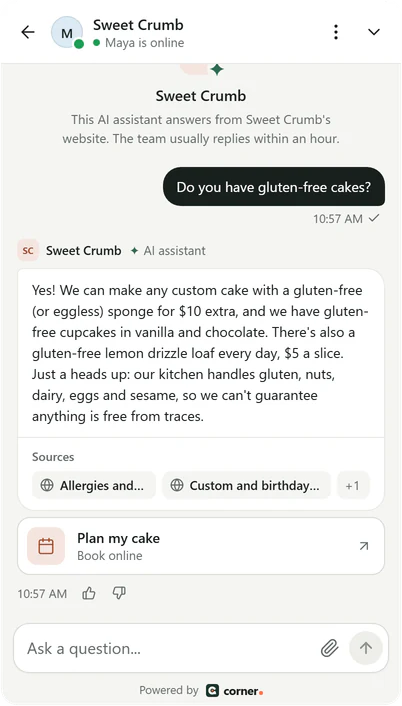
Real Corner messenger, demo bakery.
Steps for Shopify
About five minutes. No coding skills needed: you copy one line and paste it where Shopify takes custom code.
- 01
Copy your line from Corner
Sign up free and type your website. Corner reads it while you watch, and your line is in Settings > Channels > your website > Install with your assistant's key filled in. Not the one who edits the site? Email the line to your web person from the same page.<script src="https://api.getcorner.ai/widget.js" data-bot="YOUR_ASSISTANT_KEY" async></script> - 02
Open your theme's code
In Shopify admin, go to Online Store, then Themes. Next to your live theme, click the three dots and choose Edit code. Shopify suggests you duplicate your theme before you edit its code, so you have a copy to go back to. (checked 2026-10-12) - 03
Paste the line into theme.liquid
Open layout/theme.liquid, paste your line just before the closing body tag, and click Save. Every page of your store uses this file, so the messenger shows everywhere.<script src="https://api.getcorner.ai/widget.js" data-bot="YOUR_ASSISTANT_KEY" async></script> </body> - 04
Check it's live
Open your website once. The Install tab in Corner changes to Live, usually within a minute. The messenger goes live after you confirm your email address, with the code Corner emailed you.
The same line works on any website. Guides for WordPress, Wix, Squarespace, Webflow and Lovable, and the Shopify steps in the docs. Every integration
If it doesn't work on Shopify
What to check first, before you write to us.
- Your store still has a password page
- Before launch, Shopify puts the whole store behind a password, and Corner can read only public pages. Remove the password in Online Store, Preferences when you open the store, or add your content to Corner as text until then.
- It went away after a theme update
- Shopify adds an updated theme to your theme library as a new copy, and edits to its code don't carry over. Paste the line into the new copy's theme.liquid before you publish it.
- It isn't on the checkout
- That's expected. Shopify's checkout doesn't use your theme's code, so the messenger shows on every store page but checkout.
What Corner reads on a Shopify site
Corner reads your products, collections, pages, blog posts and policies, like shipping and refunds. Shopify makes a sitemap and lists it in robots.txt, so Corner finds your products from there and from your links.
It skips the cart, checkout and account pages, search results, and anything your store's robots.txt asks crawlers to leave alone.
A big catalog can pass your plan's page limit: 100 on Free, 500 on Starter, 2,000 on Builder and 5,000 on Studio. Builder reads up to 2,000 pages per website, and you can leave out any page you don't need.
Shopify notes
Corner isn't a Shopify app. There is nothing to install from the App Store, and Corner gets no access to your orders, customers or payments.
Switching to another theme? Add the line to that theme's theme.liquid too. Your current theme keeps it until you change it.
For order questions (“where is my parcel?”), the assistant can offer your team, and you reply from the Corner inbox with the order open in Shopify.
What it does and doesn't do
- It answers from your store's pages and policies, with sources.
- It can't look up orders, change a cart or take a payment. It can show a link, like your returns page, as a button.
- It isn't in the Shopify App Store: you add one line to your theme.
- The assistant is the same on every platform. How the AI chatbot answers
Shopify questions
Ready to see it answer on your Shopify site?
Type your website. Corner reads your pages in about a minute, before you install anything. No sign up.
Free plan, no card. Live chat is unlimited on every plan.