An AI chatbot for your WordPress site, added in one line
Corner adds an AI chatbot and live chat to your WordPress site with one line in the footer. It reads your pages and posts, answers visitors with sources, and hands chats to you.
Free forever: unlimited live chat and 30 AI conversations a month. No card.
No sign up to try it.
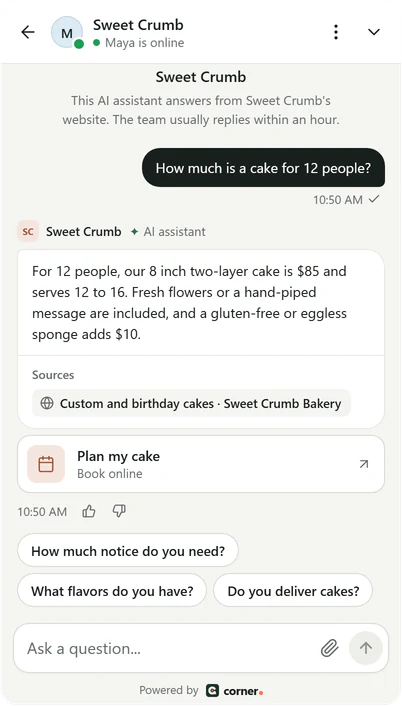
Real Corner messenger, demo bakery.
Steps for WordPress
About five minutes. No coding skills needed: you copy one line and paste it where WordPress takes custom code.
- 01
Copy your line from Corner
Sign up free and type your website. Corner reads it while you watch, and your line is in Settings > Channels > your website > Install with your assistant's key filled in. Not the one who edits the site? Email the line to your web person from the same page.<script src="https://api.getcorner.ai/widget.js" data-bot="YOUR_ASSISTANT_KEY" async></script> - 02
Add the free WPCode plugin
In WordPress, go to Plugins, then Add New. Search for WPCode, then install and activate it. It's a free plugin that adds code to every page of your site. - 03
Paste the line into the footer
Open Code Snippets, then Header & Footer. Paste your line into the Footer box and click Save Changes. Using a caching plugin? Clear its cache, so visitors get the page with the messenger.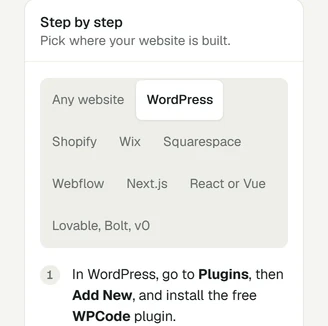
Real Corner dashboard: the install guide with WordPress picked, demo bakery.
- 04
Check it's live
Open your website once. The Install tab in Corner changes to Live, usually within a minute. The messenger goes live after you confirm your email address, with the code Corner emailed you.
The same line works on any website. Guides for Shopify, Wix, Squarespace, Webflow and Lovable, and the WordPress steps in the docs. Every integration
If it doesn't work on WordPress
What to check first, before you write to us.
- Visitors don't see it, but you do
- A caching plugin, or your host's cache, is still sending the page from before you added the line. Clear the cache in the plugin (WP Rocket, W3 Total Cache, LiteSpeed Cache and others each have a button for it), then open your site in a private window.
- It doesn't show at all
- Check that the line is saved in the Footer box of WPCode's Header & Footer page, not inside a snippet that runs only on some pages or is switched off.
- A plugin that speeds up scripts broke it
- Plugins that combine or delay JavaScript can hold the line back until a visitor scrolls or taps. Add widget.js to that plugin's list of scripts to leave alone.
- Corner can't read the site
- A security plugin can block crawlers, and the “Discourage search engines” box in Settings, Reading marks every page noindex, which Corner skips. Allow CornerBot, or untick the box once your site is ready for visitors.
What Corner reads on a WordPress site
Corner reads your pages and posts. It starts at your home page, reads the sitemap your robots.txt names (WordPress lists its own, and SEO plugins like Yoast make one too), then follows links from page to page.
WooCommerce product pages are read like any page, so the assistant can answer about products, prices and delivery as your shop shows them.
It skips the admin and login pages (wp-admin, wp-login), the WordPress API (wp-json), feeds, the cart, checkout and My Account pages, search results, add-to-cart links and sorted or filtered shop lists. Pages marked noindex are skipped too.
How many pages: 100 on Free, 500 on Starter, 2,000 on Builder and 5,000 on Studio. Re-reading every day or every week keeps answers up to date when you publish a new post.
WordPress notes
Corner isn't a WordPress plugin today. WPCode is a free plugin from another company that puts your line on every page. If your theme or page builder has its own place for footer code, the same line works there.
The line lives in WPCode, not in your theme, so it stays when you change themes. If you pasted it into a theme file instead, add it again after a theme change or update.
On WordPress.com, whether you can add a plugin depends on your plan. Check yours first, or use any place your plan gives you for footer code.
What it does and doesn't do
- It answers from your pages, posts and product pages, and shows the pages it used.
- It can't look up WooCommerce orders, carts or customer accounts.
- There's no Corner plugin to install: one line in your footer adds it, and removing the line removes it.
- The assistant is the same on every platform. How the AI chatbot answers
WordPress questions
Ready to see it answer on your WordPress site?
Type your website. Corner reads your pages in about a minute, before you install anything. No sign up.
Free plan, no card. Live chat is unlimited on every plan.